
My Honest Review of Signos CGM Weight Loss App
December 1, 2025
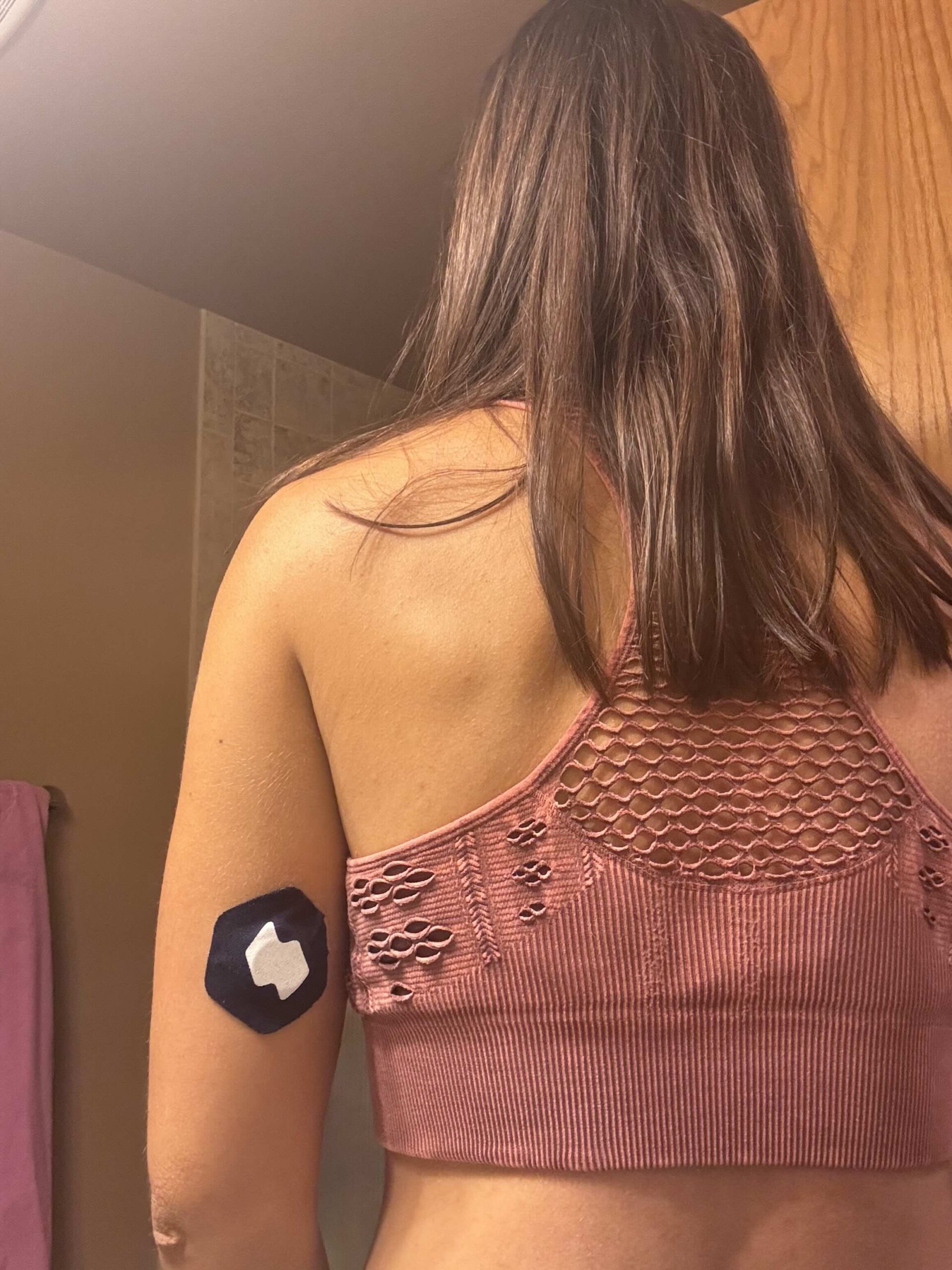
If you’ve been around here for a minute, you know I’ve used a continuous glucose monitor (CGM) for over five years as a non-diabetic. It’s been one of the most powerful tools in my entire health journey and the reason Glucose Glow Up even exists today.
So when I got the chance to try out Signos, I said yes immediately. It uses the Dexcom Stelo CGM paired with an AI-driven app, and I decided to give it a full month so I could really understand how it works, how it thinks, and how it could help someone looking to improve their metabolic health or lose weight.
This blog walks you through my onboarding, Week 1 and Week 2 experiences, what I liked, what I didn’t like, and my honest take on the Signos app for weight loss management and overall metabolic insights.
I did on onboarding with Signos blog post here for you to check-out too.
What Is Signos? And Why Did I Try It?
Signos is a weight-loss-focused CGM program that pairs the Dexcom Stelo sensor with an app that analyzes your glucose, your behaviors, your food logs, and movement to help you make choices in real time.
I wanted to test it because:
- I already use CGMs regularly
- I teach people how to understand glucose
- I’m always curious about new tools that make metabolic health easier
- the first-ever FDA-cleared, over-the-counter continuous glucose monitoring (CGM) system for weight management and wellness. With the holidays around the corner, Signos makes a unique, science-backed addition to wearable tech round-ups and healthy gift guides.
- By pairing an over-the-counter biosensor with its proprietary AI-driven app, Signos delivers personalized, actionable insights based on real-time glucose data. The system helps users understand how food, sleep, stress, and exercise impact metabolic response, and then provides guidance to support sustainable habits.
I also wanted to see what the AI felt like, how it interprets data, and how helpful its feedback actually is.
Here’s how it works:
- Real-time guidance: If something you eat spikes glucose, the app can suggest the right type and intensity of movement (based on your history) to help bring it back down.
- Personalized tracking: Signos uses glucose data plus millions of data points from logged meals, workouts, and other habits to deliver recommendations tailored to the individual.
- Long-term benefits: Over time, keeping glucose levels stable can lead to better energy, sharper focus, improved metabolic health, reduced risk of chronic conditions, and sustainable weight management.
Really quick – if you have diabetes or on insulin this is not for you. Also if you have an eating disorder or a history of one, this is not a good solution for you.
Week 1: Getting to Know the Signos App
My first impression was the app was really clean and easy to read.I didn’t really have a hard time finding anything, just getting used to using a new app which is normal. The first week for me was really all about finding my grove and learning the app experience.
There are a few big features with almost any CGM software and that is logging your meals and snacks and with logging your meals, once meals and logged, the app is used as a tool to either help predict what will happen or will show you what’s happening.
You could use the meal logging ahead of time and then you could see the impact and perhaps choose to change your meal if the app says “a high or moderate impact” is expected. I have done a mix of both. If I already know what I am going to eat, it does help to load it ahead of time, but depends on how much time you have at one time.
Other times, you may not always know or something unexpected comes up. So with Signos, the app lets you know what sort of impact to expect. If it’s in real time and your glucose is rising fast, there is a timer feature that will say “Fast rise predicted Move now to steady your glucose levels.” I think it has some good intentions. It does sort of feel like the app is shouting at you, but it is important to see that what you’re eating is having an impact on your levels. Now in some cases, I found that it did rise, but became steady rather quickly. So is the anxiety of the timer worth it? Maybe not, but I do understand the accountability factor.
I would love if instead of shouting, it shifted toward analytics and explanation of the meal and snack choices. It could also be a prediction AND analysis of the meal or a score so I can see later what was working.
The insights tab does show your biggest and smallest spikes which is helpful, showing how much of a rise each meal caused. Could the AI functionality provide more insight? I think so.
Food Logging
A few notes on the food logging. The food logging system didn’t feel intuitive at first to me.
You can search foods and add them, but when adjusting serving size I kept accidentally hitting “remove from meal,” which deletes the whole item. So there was some confusion for me between hitting the “back arrow” or hitting “save meal”
Week 2: When the AI Starts Learning + My Notes
After a week of data, the AI starts to see and notice patterns which can be helpful especially with weight loss being the goal. You also start to get into a groove with tracking and knowing your way around the app at this point. I felt like it was something I was excited to check and see my progress versus another “to do.”
A few things that happened during week 2:
The App Estimated My Weight
So, I don’t track my weight. I don’t even own a working scale right now.
But one day, the app plugged in a brand-new weight for me based on my food logs and calories. So if you aren’t inputting EVERYTHING exactly how you had it, that number could be skewed. If you are trying to lose weight, you’d likely be logging your actual weight anyway… but if you’re not, this feature feels a little strange.
I also want to call out something I’ve learned from using a CGM for over 5 years….
CGMs are not 100% Accurate
My Week 2 average glucose was higher than Week 1. I double-checked using a glucometer, and yep, the CGM was running a little high.
This is normal and happens with any CGM, but I want to call it out: If you’re not double-checking occasionally, this could be discouraging. Especially with the insights tab and overall stats being about staying in range and not having many spikes, if your CGM is running higher or lower, you may not be getting 100% accurate insights in the app. So if you aren’t getting 100% in range or your average glucose doesn’t seem like the best it has been in previous weeks, know that this is likely a nuance of wearing a CGM. It tracks enough for you to see the impact, but clinging to the exact numbers could become too all consuming.
What I Liked About The Signos Experience
There is a lot I genuinely enjoyed about Signos.
The Overall Look + Feel
The app is clean, light, simple to navigate, and not overwhelming. I like the visual graph that you can move to toggle throughout the day and your meals/snacks. It just felt like I got a good snapshot from the home screen.
The Insights Tab
One of my favorites. You get:
- Daily score
- Glucose variability
- Time in range
- Spikes per day
- Last spike time
And everything is color-coded so it’s easy to understand in a quick glance.
The variability metric might be my favorite of all.
It tells you not just your overnight average glucose, but how much your glucose is moving up and down during the day — using percentages instead of raw numbers.
The App Challenged Me
As I wrapped up Week 2, the app told me I was doing so well that it asked if I wanted to lower my target range from 140 mg/dL → 130 mg/dL.
I said:
“Okay… okay… FINE!”
Honestly?
I loved the challenge.
It made me think twice and stay more intentional.
Just an FYI – A “spike” only counts when glucose goes above 140 mg/dL or in my case it went down to 130mg/dL.
So even if you have a decent rise, it doesn’t penalize you unless you cross that threshold.
Helpful for beginners who might otherwise feel discouraged.
Workout Tracking
You can log a workout in real time and watch glucose + heart rate + calories burned (if paired with your Apple Watch).
I haven’t personally used it yet, but I love the concept. It’s motivating.
Meal logging
You can take a photo and let the app decide what it is, talk or type to describe your meal, scan barcodes, or just search for individual items. I did find that some of my foods were not in the database, but I just selected the closest thing I could find.
What Needs Improvement (In My Opinion)
- The “move now” alerts feel too aggressive
- Meal logging is clunky at first if you are trying to adjust servings or add a lot of things to meals.
A meal analysis after instead of just a prediction and alert to move. There is not a meal score. Also your daily score only takes into account how long your were in your target range. It doesn’t seem to be affected by how large of a glucose increase your meal saw from what I can tell.
How I Personally Use Signos
Since I’m not using this for weight loss right now, I tracked differently:
- I use LOTS of tags
- I didn’t track weight at all
- I log workouts but do not use the timer in the app
- I focused more on insights, variability, and behavioral patterns
The app will always be more accurate the more you log, because AI depends on your data so I am trying to be even more intentional about adding as much as I can. The tags and notes help me to remember what was going on at that time. I’m not sure they really impact how the app works or suggests things for you.
My Thoughts on Signos as a Weight Loss Tool
I want to talk about this, because Signos is definitely marketed heavily for weight loss.
Here are my thoughts:
Wearing a CGM doesn’t magically drop pounds. But it absolutely increases awareness and accountability.
It’s like having:
- a coach on your arm
- a coach in your phone
- and a mirror reflecting your choices back to you in real time
Overall, so far I think this being marketed for weight loss is good. I think it becomes an awareness thing that I talk about a lot. You weren’t really aware of how food was impacting you and it prompts you to make changes. You also get out of it what you put in. AI can only help with what you give it to work with, right? If you don’t track meals or exercise…
I think some people could get discouraged, the Stelo CGM is not the most accurate for numbers (or really most CGMs due to them measuring the interstitial fluid). BUT what I mean is if you are discouraged that the app said you spiked but maybe the CGM was wonky, I wouldn’t want someone to feel like they have to be perfect. I think some of us can fall into that trap. Just want to put that out there.
Just a bit of the science…
When you understand glucose and insulin, and remember that insulin is a growth hormone, it makes sense why balancing blood sugar is key for fat loss.
Food is converted into glucose and glucose is your main energy with excess getting stored in fat cells. If this happens all the time, long-term, that’s where unwanted fat mass increases.
And remember:
- sleep
- stress
- hydration
- movement
…all impact glucose too.
Food journaling also shines a big light on your habits and Signos has the extra push to see how it’s impacting you.
BUT….
You can’t stay in a calorie deficit forever. And your weight might not change even if your body composition is improving. I think alongside weight loss, you also need to consider you body composition changing without the weight necessarily moving to the number you were in high school.
If Signos added a body comp insight in the future, I think that could be interesting.
PRICING
- Starter plan: $299/month for 1-month commitment
- 3-month plan: $199/month
- 6-month plan: $169/month
- You have access to the app and get 2 CGMs per month with these packages. Six-month plans ship in three-month bundles.
- Signos does not have the option to bring your own CGM, you get it as a packaged deal.
- You also get a welcome kit with sensors, performance covers, and setup instructions.
I do believe in investing in your healthh, I also think only 1 month isn’t enough time to really get into a flow unless you really just want to try it out and see what the hype is all about. I think 3 months is a good start and it gives you some momentum. For a 25 lb weight loss, the Signos website recommends the 6-month plan, but I do think this would be very individualized.
Special Offer – 25% off Monthly Subscriptions
Signos is offering my audience 25% of their monthly subscriptions.
Visit their website here and enter KAITYM at checkout to get the discount. Let me know if you try it out, would love to get your thoughts!
Why Consider a CGM Software Outside of Just the Manufacturer, Like the Stelo App
Using a CGM app beyond the basic manufacturer app can make a huge difference in how you understand your data. You get far more interpretation, the ability to add notes, and deeper assessments of what’s actually happening with your glucose. The graph is more intuitive, easier to slide through, and gives you a clearer picture of your day. Overall, it offers more interpretation and analysis, something that’s especially helpful when you’re trying to make real behavior changes, not just see numbers on a screen.
So the verdict is…
If I wanted an accountability tool, I would give Signos and try. The Stelo CGM gives the data and Signos helps interpret and be a guiding hand on your journey. I like Signos and think its a great tool with a few quirks that can work as much as you put into it. It’s a journey and we need to put the work in but apps like Signos help create the disciplines and habits we all need to make change.
Leave a Reply
X
X


Not all healthy foods are created equal. Some seemingly innocent choices can send our glucose levels soaring into the diabetic range, leaving us grappling with symptoms like fatigue, irritability, brain fog and feeling hangry.
5 Healthy Foods That Might Be Spiking Your Blood Sugar
explore the podcast
I'm here to empower others to achieve balanced blood sugar levels and break the stigma that managing blood sugar is just for diabetics. Despite the challenges posed by our broken food system, there are ways to navigate it and prioritize your health.
Tune it bi-weekly
The Glucose Glow Up Show


Why am I breaking the stigma that tracking glucose is just for diabetics?
I'm Kaity! Being an athlete and health-conscious individual all my life, I've always prioritized my well-being. However, as we prepared to start our family, I discovered I had insulin resistance. Determined to overcome this obstacle, I went all in on researching metabolic health.
I've not only achieved balance in my blood sugar levels, (my glucose "glow up") but also found more energy to pour into my family. Now, I'm passionate about sharing the tools and strategies that have transformed my life so others can also experience a glucose "glow up!"
Welcome, I'm glad you're here.

Add a comment
0 comments